Dashboard
burn ui serves a dashboard from the local ledger. It is one self-contained HTML file and one JSON endpoint, both on 127.0.0.1. There are no CDNs, external fonts, cookies, or analytics.
Run it
burn uiburn ui on http://127.0.0.1:4747
Ctrl+C to stop.The default port is 4747. Use --port to move it:
burn ui --port 4750The dashboard reads the same BURN_HOME as the rest of the CLI. If you move the ledger, start both the proxy and the UI with the same BURN_HOME.
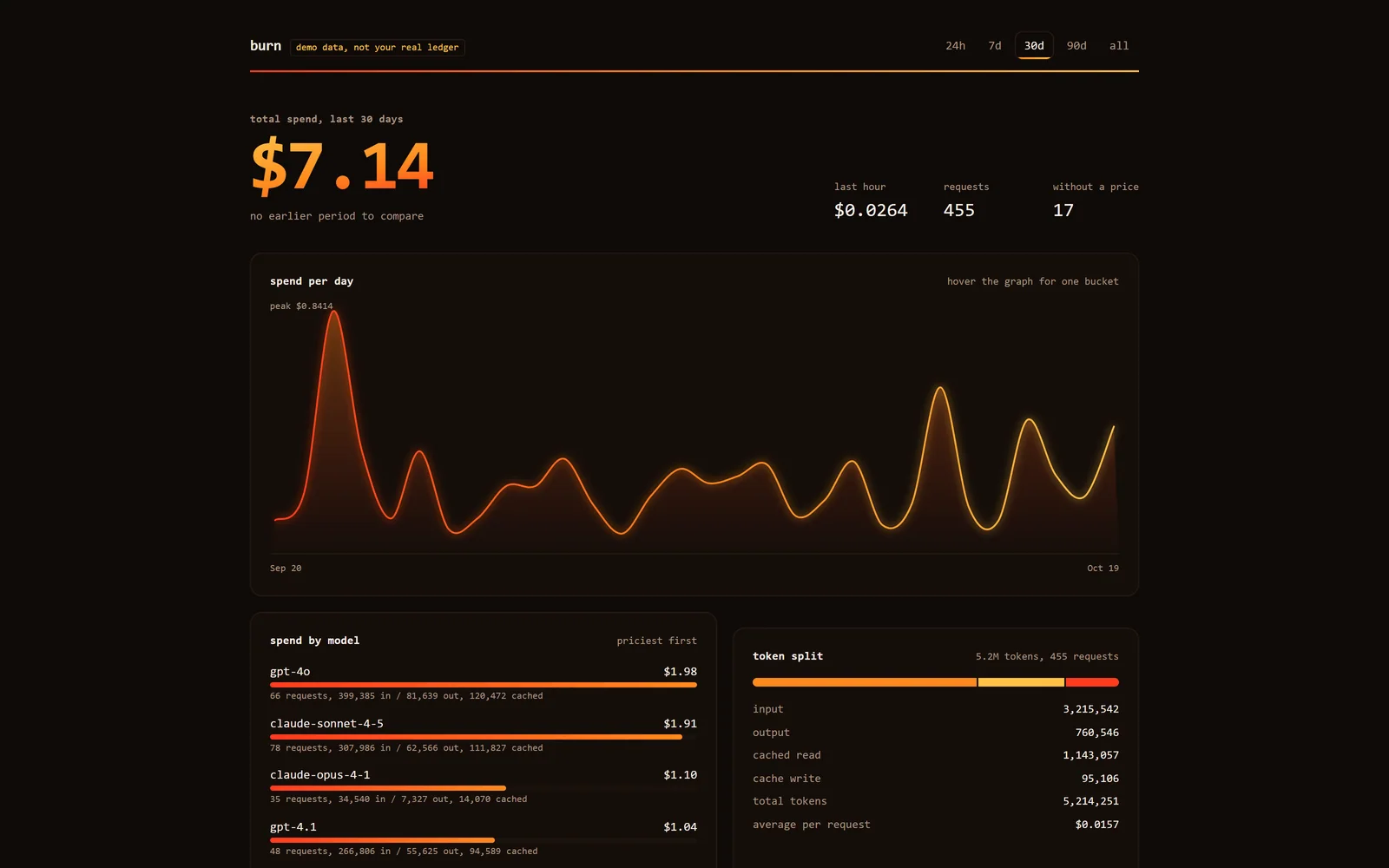
Example: burn ui --demo, 30 day range. The page is marked "demo data, not your real ledger".
Ranges
The range tabs are 24h, 7d, 30d, 90d, and all. All boundaries use local time.
| Range | Window | Graph buckets |
|---|---|---|
24h | The last 23 hours, floored to the start of the hour, through now. | Hourly |
7d | From local midnight six days ago through now. | Daily |
30d | From local midnight 29 days ago through now. | Daily |
90d | From local midnight 89 days ago through now. | Daily |
all | From the day of the first logged request through now. | Daily |
The default is 24h. The today report is different from the 24h tab: burn today starts at local midnight, while the dashboard's 24h tab is a rolling 24-hour window aligned to the hour.
Panels
- Total spend for the selected range, with the number of requests.
- Change against the previous period. The previous window has the same span as the selected one. The dashboard shows the previous spend and request count so you can compare.
- Last hour. Spend and requests in the last 60 minutes, independent of the selected range.
- Spend graph. Cost per hourly or daily bucket. Empty buckets are still drawn, so gaps are visible.
- Spend by model. Sorted by cost, then by request count.
- Token split. Input, cached, and output tokens for the selected range.
- Recent requests. The 40 most recent rows, newest first, with provider, model, tag, token counts, cost, latency, status, and stream flag.
- Refresh. The page fetches new data every five seconds. The server sends
cache-control: no-store.
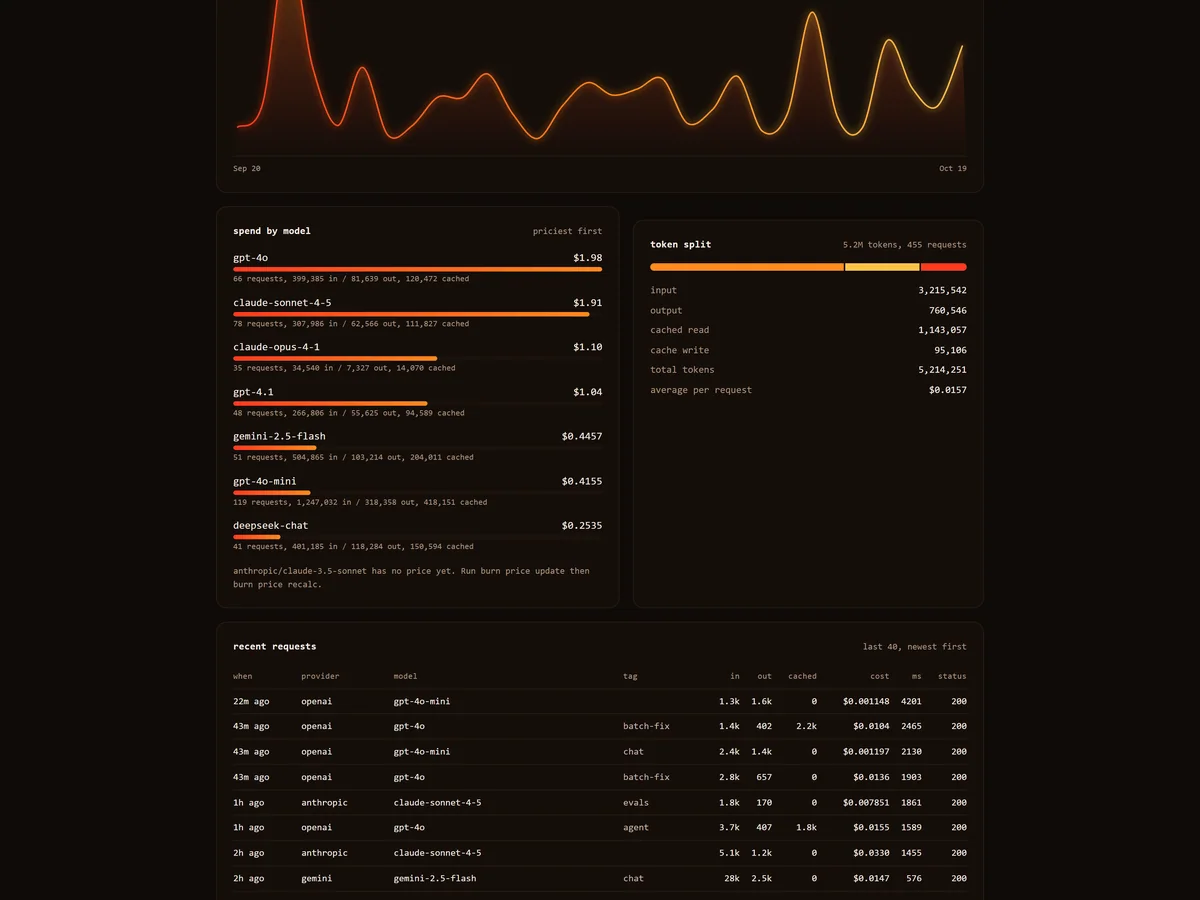
Example data: spend by model, token split, and the recent requests table.
The page is keyboard accessible and responsive down to phone width. It respects prefers-reduced-motion.
Demo mode
burn ui --demoDemo mode does three things:
- Creates a temporary directory and sets
BURN_HOMEto it for the UI process. - Seeds 30 days of made-up traffic with a fixed seed, using the bundled fallback price list.
- Marks the page as demo data while it runs.
Your real ledger is untouched. The temporary directory is removed when the process exits. This is the fastest way to look at the panels before routing real traffic.
The demo data is generated locally. It is not downloaded and it is not a sample from another user.
Data endpoint
The page is backed by one endpoint:
GET /api/data?range=24hrange accepts 24h, 7d, 30d, 90d, or all; anything else returns HTTP 400. The JSON payload contains:
| Field | Meaning |
|---|---|
range, label, unit, from, to | The selected window and its bucket unit. |
demo | Whether the process is serving demo data. |
totals | Requests, input, output, cache read, cache write, reasoning, cost, and unpriced count. |
prevTotal, prevRequests | The previous window with the same span. |
lastHour, lastHourRequests | The last 60 minutes. |
series | Buckets with cost, requests, input, output, cache read, and an unpriced flag. |
byModel, byProvider | Grouped totals, sorted by cost. |
recent | The 40 most recent rows. |
The endpoint is local and has no authentication, like the rest of the UI.
Privacy and access
The dashboard binds to 127.0.0.1. It serves the page with a restrictive content security policy: no remote scripts, no remote styles, no remote images, no form submissions. There are no cookies and no outbound requests from the page.
It has no login. Anyone who can reach the port can read the ledger. That is fine on a laptop; it is not a multi-user service. Do not bind it to a public interface or put it behind a public reverse proxy.