Know what every LLM call costs.
burn is a local proxy. Point your SDK at it, and every request is priced and written to a SQLite ledger on your machine. Prompts and responses are not stored.
npx @xnah/burn proxyor install globally: npm install -g @xnah/burn
Node 22.5 or newer. MIT. No runtime dependencies.
Example ledger
Last 30 daysTotal spend
$38.4200
Today
$4.2831
- claude-sonnet-4-5$12.84
- gpt-4o$9.12
- gemini-2.5-flash$1.46
- other models$15.00
Example data. Your ledger stays in ~/.burn.
- 6
- providers built in
- 0
- runtime dependencies
- 24h
- price cache
- 1
- SQLite file, local
How it works
There is no account and no service to run. The proxy is a process on 127.0.0.1, and the database is a file you own.
- 01
Start the proxy
It prints the export lines and listens on 127.0.0.1. Leave it running while you work.
npx @xnah/burn proxy - 02
Point your SDK at it
Use the OpenAI or Anthropic route. The request is forwarded unchanged.
OPENAI_BASE_URL=http://127.0.0.1:8787/openai/v1 - 03
Read the ledger
One command for the terminal, one for the dashboard. Both read the same SQLite file.
burn today | burn ui
What it prints
The table shapes are the CLI's own. The numbers below are example data, not a claim about your traffic.
The same rows feed the reports, the dashboard, and the export. One request, one row, one price.
$ burn today

today: 128 requests, $4.2831

model                 requests   input   output   cached       cost
--------------------  --------  ------  -------  -------  ---------
claude-sonnet-4-5           41  284,102   61,330   18,204  $2.1042
gpt-4o                      52  120,994   44,812    9,300  $1.4021
gemini-2.5-flash            30   88,411    9,220        0  $0.0421
deepseek-chat                5    9,882    2,104        0  $0.0052

3 requests have no price. Run "burn price update" to fetch prices,
then "burn price recalc" to fill them in.
$ npx @xnah/burn proxy
burn proxy listening on http://127.0.0.1:8787
providers: openai, anthropic, openrouter, deepseek, groq, gemini

export OPENAI_BASE_URL=http://127.0.0.1:8787/openai/v1
export ANTHROPIC_BASE_URL=http://127.0.0.1:8787/anthropic

point your SDK at those URLs. Ctrl+C to stop.

burn  openai  gpt-4o  $0.0124  in 1,842, out 316, cached 1,024
burn  anthropic  claude-sonnet-4-5  $0.0211  in 2,104, out 428, cache write 512
burn  gemini  gemini-2.5-flash  $0.0009  in 1,208, out 184
What is inside
The proxy does one job: forward the request, read the usage, price it, write a row. Everything else is a report on that row.
Providers
Six routes are built in. The first path segment picks the provider and the format.
- openai/openaiopenai
- anthropic/anthropicanthropic
- openrouter/openrouteropenai
- deepseek/deepseekopenai
- groq/groqopenai
- gemini/geminiopenai
Add any OpenAI-compatible endpoint with burn provider add.
The rest of the surface
- Streaming responses
- Reads usage from server-sent events as they arrive. Adds stream_options.include_usage for OpenAI chat streams when the caller did not ask for it.
- A public price list
- A LiteLLM-compatible map from CloudPrice, cached for 24 hours, with a bundled fallback for first runs and offline machines.
- Budgets that can block
- Set a daily limit. burn warns once per process, or answers HTTP 429 at the proxy once today passes it.
Tags per project
Send x-burn-tag with a request. The row is tagged and the header is stripped before forwarding.
CSV and JSON export
Every logged request, with token counts and cost, ready for a spreadsheet or another tool.
Zero dependencies
One package, Node 22.5 or newer, and the SQLite module that ships with Node.
MIT licensed
Read the source, change it, ship it. The CLI and this site are separate repositories.
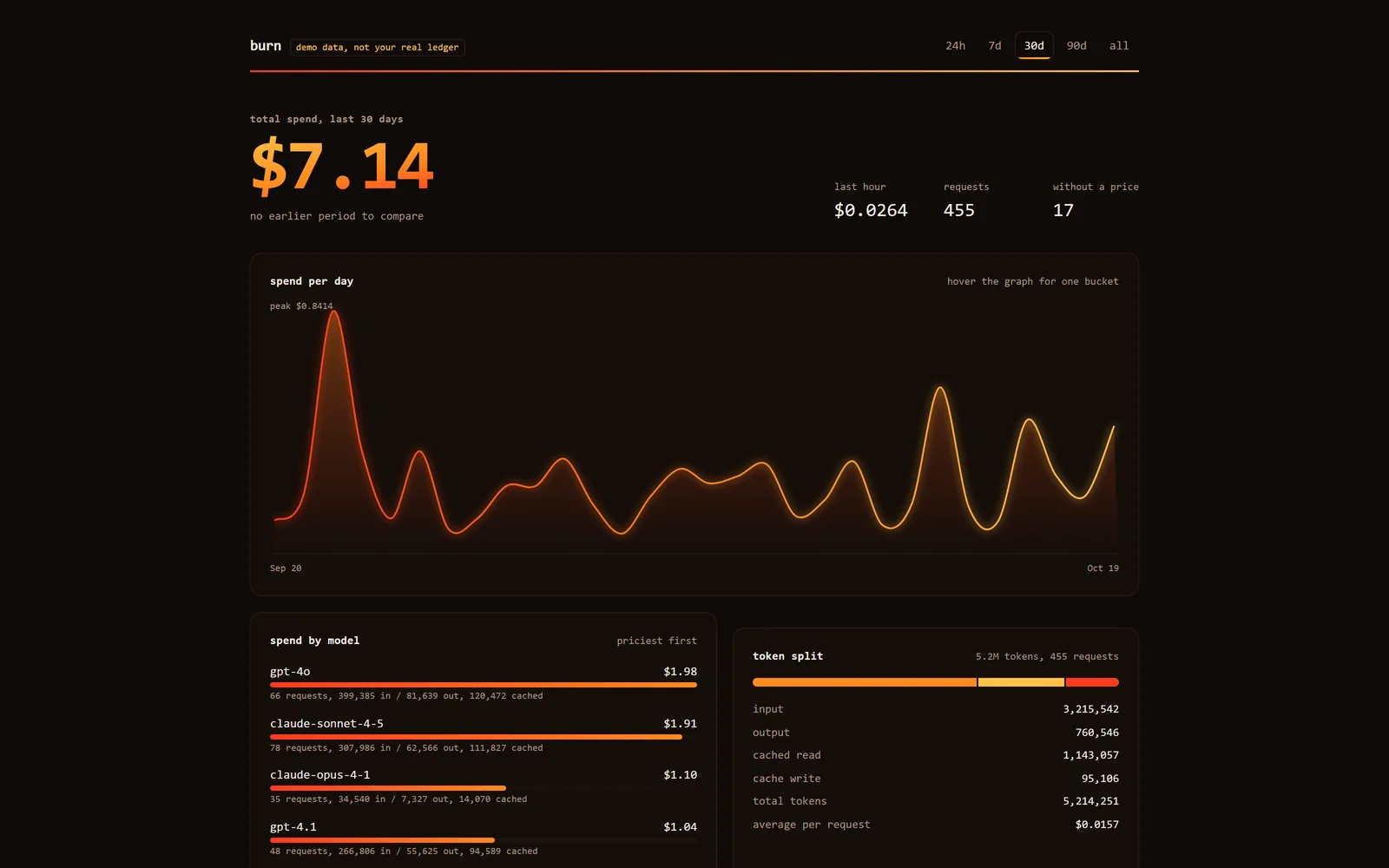
The dashboard is the ledger.
burn ui serves one self-contained page from 127.0.0.1. No CDN, no external fonts, nothing loading from the network.
- Range tabs for 24h, 7d, 30d, 90d, and all time.
- Total spend, the previous period, and the last hour.
- Spend by model, token split, and the 40 most recent requests.
- Refreshes every 5 seconds and respects reduced motion.
burn ui --demo
Example data. Your ledger is untouched.
Prompts do not go in the database.
burn writes metadata only. Not prompts, not completions, not request bodies. The database is a local file, and the dashboard reads from it on 127.0.0.1.
The only outbound call burn makes itself is the price list download. CloudPrice publishes it. Set BURN_OFFLINE=1 to turn even that off.
Read the security modelStored
- Timestamp
- Provider
- Model
- Tag
- Token counts
- Cost
- Latency
- HTTP status
- Stream flag
Never stored
- Prompt text
- Response text
- Request bodies
- Response bodies
- API keys
- Cookies
- Client IP addresses
- User identifiers
From zero to a row in SQLite.
Requires Node 22.5 or newer. Nothing else. The proxy prints the export lines for you.
- Start the proxy and leave it running.
- Point your SDK at 127.0.0.1:8787.
- Use your app, then run burn today or burn ui.
$ npx @xnah/burn proxy

# in a second terminal, point your SDK at the proxy
export OPENAI_BASE_URL=http://127.0.0.1:8787/openai/v1

# use your app as usual, then read the ledger
burn today
burn ui
Questions
More detail lives in the documentation.
Does burn send my prompts or responses anywhere?
No. The proxy forwards the request to the provider and writes only metadata to the local SQLite database: timestamp, provider, model, tag, token counts, cost, latency, status, and whether the response was streamed. The only network call burn makes itself is the price list download.
Which providers work?
OpenAI, Anthropic, OpenRouter, DeepSeek, Groq, and Gemini are built in. Any OpenAI-compatible endpoint can be added with burn provider add, and Anthropic-format endpoints are supported too.
Does it work with streaming responses?
Yes. burn reads usage from server-sent events as they pass through. Only requests where the provider reports usage are logged. Nothing is estimated from text.
What happens when a model has no price?
The row is stored with no cost and the reports count it as unpriced. burn never guesses. Run burn price update and burn price recalc, or set a price by hand with burn price set.
Can I use it on a shared server?
The proxy binds to 127.0.0.1 and has no authentication. Anyone who can reach the port can use your provider credentials through it. Keep it on your own machine and do not expose it on a network interface.
Why does the number differ from my provider invoice?
Prices are best effort from a third-party list, and providers bill with their own rules: batch discounts, long-context tiers, priority tiers, free tiers, regions, and negotiated rates. burn is for watching trends and catching surprises, not for reconciling an invoice.